


Enterprise app deployment has become essential for businesses looking to improve productivity, streamline workflows, and maintain control over their digital tools. However, traditional methods of deploying and managing enterprise apps, such as through Google Play, often introduce challenges, particularly in the realms of approval delays, limited control, and dependency on external platforms. Esper’s Enterprise App Management system addresses these challenges, offering developers and businesses a more efficient and flexible solution.
What is Esper’s Enterprise App Management?
Esper's Enterprise App Management system gives developers a streamlined platform to upload APKs directly, control app deployment, and facilitate quick testing or live use across a fleet of devices. It enables rapid iterations and feedback collection without waiting for third-party approvals, empowering developers to work faster and more efficiently.
With Esper, developers bypass the Play Store approval process and directly upload their APKs to the platform. This approach eliminates the hassle of waiting for Google Play’s review cycle, enabling immediate access to the latest app versions on enrolled devices.
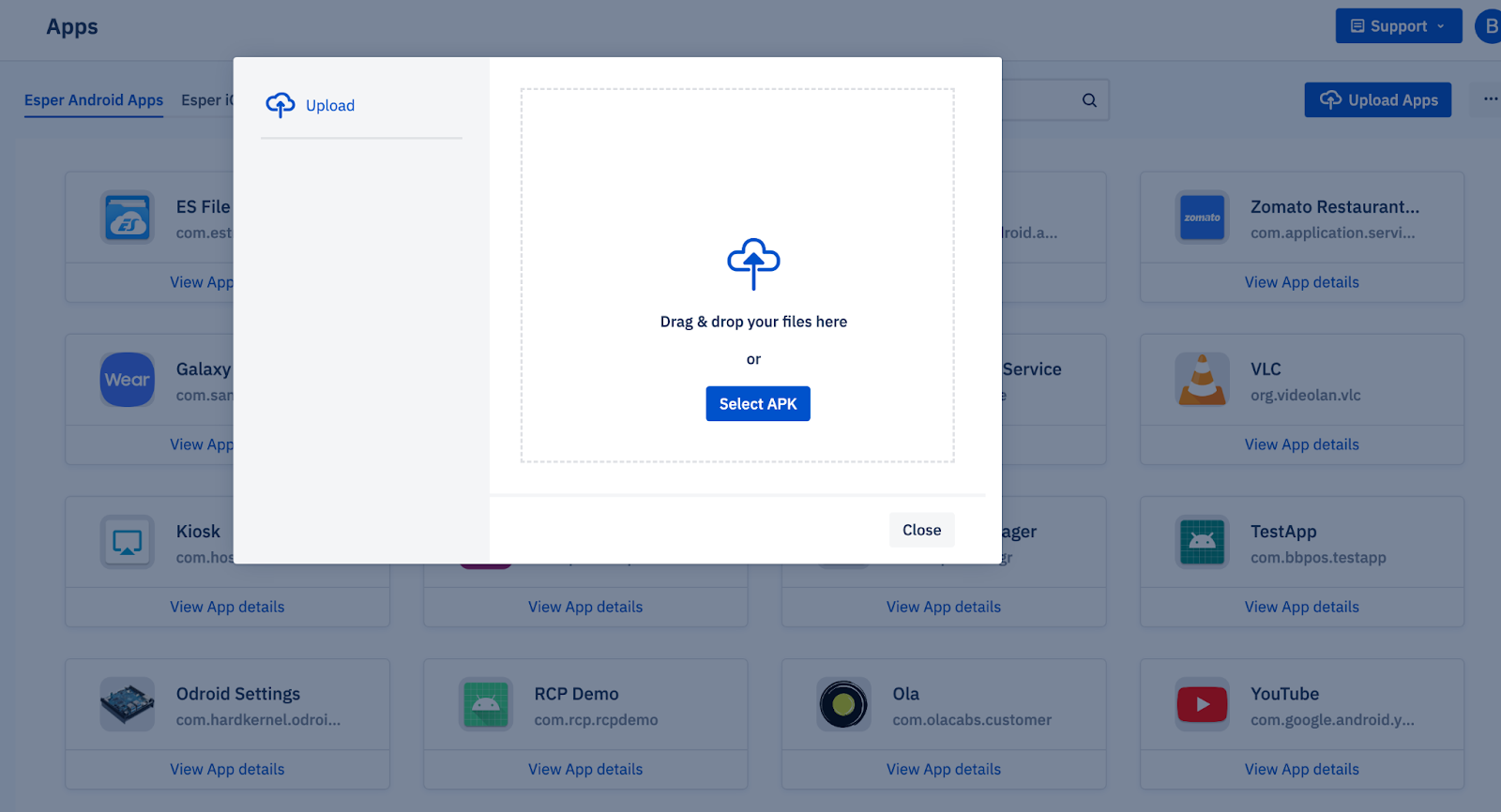
Once the APK is uploaded, developers can quickly deploy it to selected devices, whether for testing or immediate use in a live environment. Esper’s granular control over deployment ensures apps reach specific groups of devices, delivering the right app version to the right users at the right time.
How Enterprise App Deployment Works without Google Play
For businesses that prioritize speed, control, and security, distributing apps through the Google Play Store introduces unnecessary friction. While the Play Store is well-suited for consumer apps, it often falls short in meeting the needs of enterprise environments. In contrast, enterprise app deployment offers a more streamlined, flexible, and secure path — allowing organizations to manage app distribution on their terms. Here’s why enterprise apps might be the better fit for your business.
No Dependency on App Store Review Process
One of the most significant drawbacks of using Google Play is the review and approval process. This can take anywhere from a few hours to several days, delaying updates and fixes. With enterprise apps, developers avoid this process. They can immediately upload their APKs and deploy them without waiting for external approval.
Control Over Deployment and Rollout
With enterprise apps, you have complete control over who gets the app and when. For example, updates can be deployed to a select group of devices or users for testing, allowing for rapid feedback and changes. In contrast, Google Play deploys updates to the entire user base, which can be problematic if bugs or issues arise post-deployment.
Security and Compliance
Enterprise apps are often developed to meet specific security and compliance requirements. With platforms like Esper, businesses can ensure that their apps are only available to authorized users and devices, enhancing security. On Google Play, apps are made available to the public, and while security measures are in place, businesses may have less control over how the app is distributed.
Customization for Business Needs
Enterprise apps are often tailored to meet the specific needs of an organization. While Google Play apps serve the general public well, they may not cater to niche business requirements or specialized workflows. In contrast, enterprise app management platforms like Esper allow organizations to customize apps for internal use, integrate them with business tools, and deploy them in a controlled and efficient manner, ensuring smooth operations.
Additionally, apps distributed through Google Play must comply with Google Play's terms of service, which can impose certain limitations. Enterprise apps are not bound by the same distribution and policy requirements, offering greater flexibility for businesses to innovate and control the app experience.
App Lifecycle Management
Enterprise management platforms simplify app lifecycle management. Developers can roll out updates at their own pace, undo changes if necessary, and test new features on a select group of devices before making them available to a broader audience. Google Play lacks this level of fine-grained control over deployment, which can result in slower response times to user feedback or the introduction of bugs in new releases.
Why Esper Makes Enterprise App Deployment Even Better
Choosing enterprise apps over public app store distribution is a smart move. Pairing that choice with a dedicated platform like Esper helps businesses move faster, test smarter, and manage apps with precision. Here are a few key ways Esper enhances enterprise app deployment.
Faster Testing Cycles
With Esper, developers deploy new app versions almost instantaneously, which significantly reduces the testing cycle. Testing new features or fixes happens on real devices, providing immediate feedback to developers for rapid iteration.
No Reliance on Google Play’s Approval Process
The traditional route of deploying apps through Google Play can lead to significant delays due to the approval process. Esper removes this bottleneck, enabling direct app deployment without relying on external platforms for approval.
Controlled Deployment to Specific Devices or Groups
One of Esper's standout features is its granular control over app deployment. Developers can select specific devices or groups to deploy updates, allowing for targeted testing, phased rollouts, or deployment based on specific user segments. This improves control over the app lifecycle.
Use Case: Esper Enterprise Apps in Action
Imagine a developer working on a new version of an enterprise app. Using Esper’s platform, the developer uploads the APK to the system and deploys it to a group of test devices. Within hours, they gather feedback and identify issues. The developer can iterate on the app based on the feedback and re-deploy a new version, all without the delays associated with traditional app stores.
Comparison: Esper vs. Google Play for Enterprise Apps
- Approval Time
- Esper: Instant deployment after APK upload, enabling fast and efficient app rollout.
- Google Play: Requires Google's review process, which can take hours or even days, delaying app availability.
- Granular Control
- Esper: Offers precise control over app deployment, allowing it to be directed to select devices or groups for phased rollouts.
- Google Play: Apps are publicly released once approved, with no granular control over who can access them.
- Flexibility
- Esper: Supports app version management, allowing you to uninstall newer versions and install older versions as needed.
- Google Play: Rollbacks are more complex, with updates generally being irreversible once published, offering limited flexibility.
- Security and Compliance
- Esper: Ensures that apps are only deployed to authorized devices and users, maintaining secure access control and meeting compliance requirements.
- Google Play: Public app availability may present security and compliance risks, as apps are accessible by any user once published.
- Customization
- Esper: Provides extensive customization to tailor apps according to specific business needs, workflows, and integration with internal tools, giving full control over app deployment.
- Google Play: This offers limited customization, as apps must adhere to general guidelines and standards, restricting tailored solutions.
Conclusion
Esper improves enterprise app deployment by giving developers speed, flexibility, and control over their app deployments. With the ability to upload APKs directly, deploy updates instantly, and fine-tune distribution to specific devices, Esper optimizes workflows and removes the dependencies and delays associated with traditional app stores. Developers should consider leveraging Esper to streamline their app management processes and improve their deployment efficiency.


