

Digital Signage Management
Digital signage can be as simple as you want it to be or as intricate as you need it to be. That’s why combining the right device with the right management tools is so important. Whether you want an iPad in kiosk mode, an Android-powered TV, or a custom Linux box, you’re covered with Esper.

Managing my digital signage
Once you’ve found the right digital signage, it’s time to manage them. An MDM (Mobile Device Management) solution is a great tool to monitor and protect your dynamic displays. But there’s no such thing as a one-size-fits-all MDM solution. Some key factors to consider when looking for the right MDM:


Digital signage for business use cases
Digital signage puts your business on center stage. Vibrant and engaging, it enables you to give the people what they want — real-time updates, essential product information, and wayfinding assistance. Because nothing is as universally embarrassing as wandering around like a lost tourist. You’re not saving lives here, but you are saving reputations, and that’s pretty commendable.
You can find digital signage just about anywhere. These dynamic displays are sure to be serving up info at your local QSRs (quick service restaurants), retail stores, shopping malls, and airports. And while being highly customizable and updatable, it can be complicated to know exactly what type of signage will best work for your use case. Especially when it comes to interactive signage, which has some overlap with kiosks. Don’t sweat it though, we’ve got some hot tips to help you out.
Digital signage can be anything it wants — big or small, square or round, just a sign, or interactive. The latter often struggles with an identity crisis — am I signage or am I a kiosk? For example, the interactive maps found at many large airports are a form of digital signage called digital menu boards, which is also a type of kiosk. Tricky, we know!
The difference between digital signage and kiosks ultimately comes down to how you’re using and managing the device. For example, a giant digital billboard probably doesn’t need to be locked to kiosk mode since a user accessing the underlying operating system is very unlikely. You just need a way to cycle through and update the content, making this a digital signage use case. If this is you, congrats, you’re in the right place!
Interactive signage in an airport, however, needs to be treated more like a kiosk. You don’t want someone rooting around your device settings instead of checking in for their flight. If this sounds more like your use case, check out our kiosk page.
NEXT STEPS
Our hardware experts make finding the right hardware easy! Esper has guided thousands of customers to develop efficient, scalable device fleets that meet their needs. With our robust partner catalog and vast hardware support we can always find a solution.
With so many MDMs out there, why choose Esper? Well, for one, we built it correctly, with automation, flexibility, and user-friendliness at the core. The simplified provisioning, seamless remote control, and staged updates make it an automatic yes for many. It’s for the businesses that want more — more control, more ease, more free time. You in?
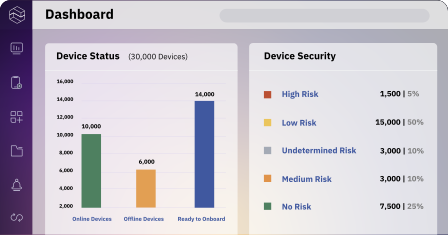

Streamlined device grouping
Easily group devices to improve organization and manage your entire device fleet all in one place.
Update at will
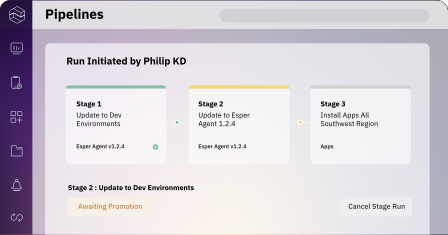
Test updates on a single device, then stage rollouts to groups based on custom rules.
Enhanced visibility
Get instant and up-to-date connectivity status, data information, and a whole lot more. All in one place.
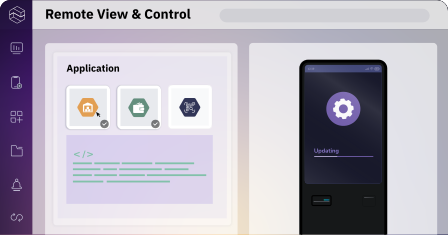
Device kitting made simple
Your IT teams can deploy dozens of devices in minutes instead of hours. Maybe even go home early.
Troubleshoot from anywhere
Remotely control and debug your devices in real-time from anywhere in the world.
Real-time updates
Update app and device configurations at will, on the fly, at any time. As often as you need.
Ensure content integrity
Protect against unauthorized content uploads or changes. Ensure only approved content is displayed.
Keep signage from disappearing
Track devices in real-time and set up a virtual geofence to protect your assets.
Accelerate incident response
Set custom alerts for automated monitoring. Receive actionable alerts and take real-time action.
Real-life examples of how Esper’s innovative solutions drive value across diverse industries

Upgrading the retail experience with digital display pricing
Esper partnered heavily with our engineering teams to pilot digital signage strips in our stores to display pricing on retail shelves. Esper made it easy to launch our custom app and create a delightful experience for our customers.

Esper is an indispensable tool for managing our devices. It allows us to effectively manage our devices both individually and as a cohesive unit. When deciding on hardware for our fleet, our first priority is ensuring it’s compatible with the Esper platform.


Remote viewing devices through the console makes troubleshooting or assisting users possible without needing a 3rd party subscription. Support for kiosks and those with multiple apps, plus the ability to provide access to select device settings, ensure users have access to everything they need to utilize the device more completely without sacrificing security.

Kiosk mode locks down devices to a single application or interface, preventing other uses. It’s a way for organizations to not only keep their devices more secure but ensure the experience for the end user is exactly as intended.
Kiosk mode is a robust, secure option for locking down devices. But it isn’t a native feature found in most operating systems — it requires dedicated kiosk software. Android and iOS both have kiosk-like features in their App Pinning and Guided Access features, but for full control of mobile operating systems, kiosk mode software is a must.
Yes. Android app pinning can provide a very limited Android kiosk mode, but without key security and management features.
Screen pinning doesn't require an MDM. For a more robust and secure kiosk mode, however, you'll need a kiosk mode provider like an MDM.
Yes! Nearly any Android device with a touchscreen can be run in kiosk mode.
For kiosks using app pinning, simply swipe up and hold (you may also need to enter the PIN, pattern, password, or biometric authentication). For apps placed into kiosk mode using kiosk software, only an administrator can exit kiosk mode.


