
There’s not always a clean answer to if switching to Linux or Android, or moving to a newer version of Windows, is the right migration path off of Windows 10 IoT LTSB 2016. The application and its vendor make the first cut at the OS level, then hardware, peripherals, and the support model settle the rest.
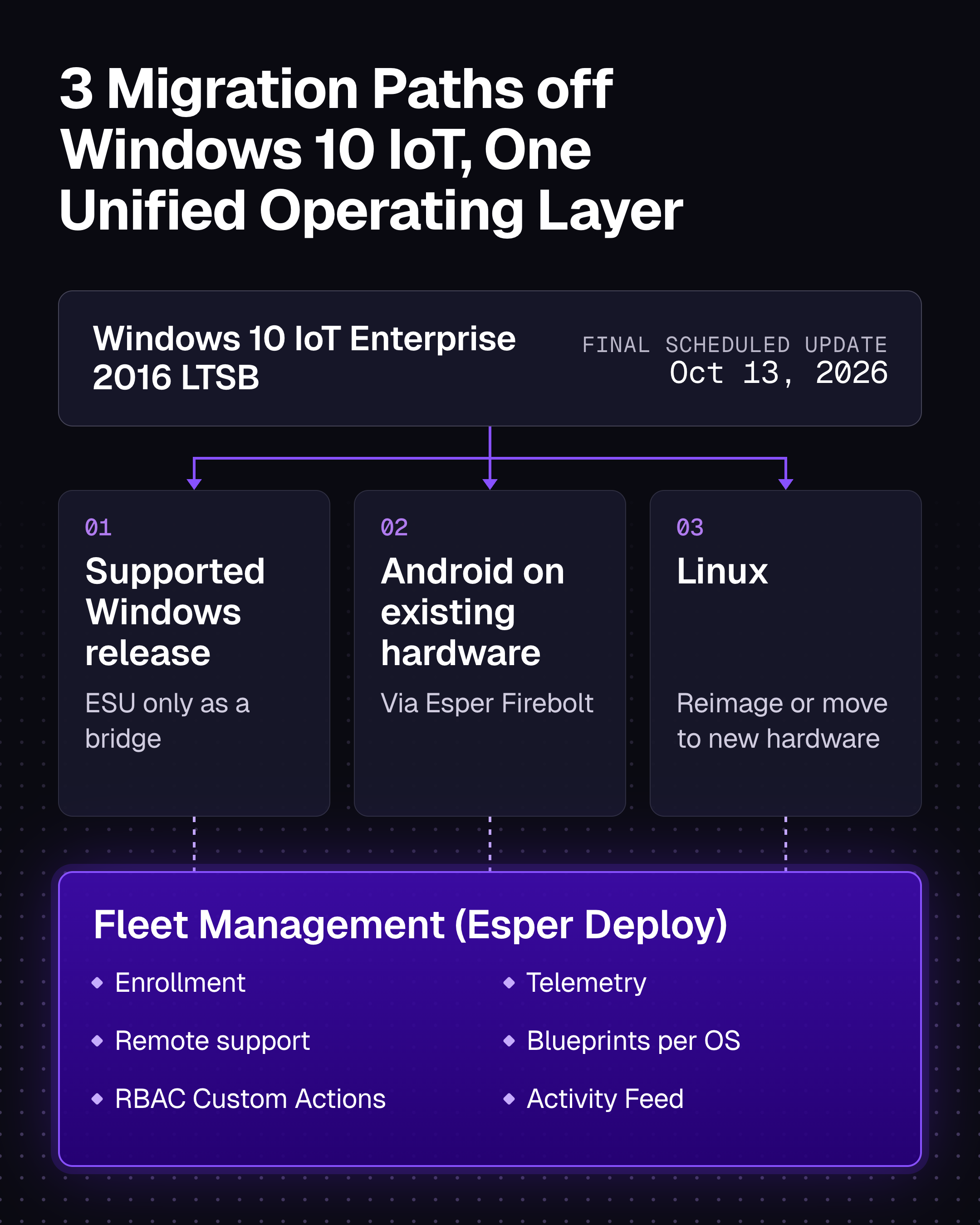
When it comes to choosing the next operating system, a Windows 10 IoT migration has three practical directions:
- Stay on Windows by moving to a supported release. Use Extended Security Updates only as a bridge where needed.
- Keep the existing hardware and move it to Android via Esper Firebolt when the application and device qualify for Esper Foundation for Android.
- Reimage the existing hardware with Linux, or move to new Linux hardware, when the application vendor or your platform team supports that path.
What to consider when migrating to Linux, Android, or a newer Windows release
Migrating from Windows 10 IoT to Linux or Android requires more than just an OS swap. Establishing robust fleet management, remote support, and operational controls is essential to successfully maintain Linux-based POS terminals and kiosks in production. If Linux piques your interest, this article is for you, but keep in mind is a that a Linux image alone is not a fleet management plan.
A Linux image can boot the application, load the peripherals, and lock the display. But when your support team still needs a way to operate devices across remote sites, production exposes missing controls quickly. They need to see the failure, reach the device, run the fix, and confirm what happened when a package needs an update, a service hangs, or screens freeze at a store three states away.
Using Esper Deploy device management to manage dedicated Linux fleets
Esper Deploy MDM manages dedicated Linux display devices in production, including devices that run an old Ubuntu release on 32-bit ARM with an OEM image, custom kernel, and custom display stack, proving that an older or custom Linux image can be manageable. It does not remove the need to test your exact image and hardware with Esper Deploy.
Give the support team buttons, not a root shell
Windows fleets often come with years of support tooling that people across IT and operations are familiar with and know how to use. A move to Linux can appear to rip away those guardrails with a terminal and root access. That’s why our Custom Actions for Linux let your Linux expert turn a vetted script into a button, toggle, radio button, or dropdown in the Esper console and assign each action to an Esper role. The people who install, configure, and support devices can then run the approved workflow via intuitive point-and-click UI, all without opening a terminal or receiving root access.
Write the script to return a meaningful result and command status shows whether the action succeeded or failed. The Activity Feed records the user, action, target, and time. Your Linux expert defines the operation once, then the rest of the team runs it inside the guardrails you set.
Esper Deploy MDM manages the image that you, your OEM, or your ISV owns. For a qualified Linux image, we provide:
- RBAC-controlled Custom Actions for repeatable setup and support workflows.
- Remote viewing on X11 and Wayland.
- A browser-based remote terminal for the people who need one, with access controlled through Esper roles.
- A per-device remote file manager for interactive support work.
- Fleet-scale script and command execution through Blueprints, with per-device status.
- File deployment through Linux Blueprints.
- Package operations through the native Linux package tooling selected for the deployment.
- Device telemetry and command status in the Esper console.
- Manual enrollment by script or first-boot enrollment through Esper Seamless Provisioning for Linux.
How reimaging with Linux on existing hardware works with Esper
If you are reimaging Windows devices with Linux, you may not be replacing any hardware. The question is what Linux image you need us to manage. All you need to do is bring us the image and rollout details:
- Processor architecture
- Linux distribution and version
- Init system
- Display stack
- Device count
- Rollout timing
These facts tell us whether the current Esper agent runs as-is and what additional work the deployment might require (the latter doesn’t disqualify your fleet).
Our current build matrix is the fast path, not the edge of the product. We extended the agent for a production fleet running Ubuntu 16.04 on 32-bit ARM. We also added Fedora support for an enterprise evaluation.
If your image falls outside the tested set, don't change distributions just to match a checklist. Bring us the image, fleet size, and timeline. If the opportunity justifies additional engineering work, we will happily scope that work with you.
Building device management into the Linux image
If you reimage existing Windows hardware with Linux, make enrollment part of the image. Esper Seamless Provisioning for Linux lets you preinstall the Esper agent and specify the Blueprint and Group before deployment. On first boot, each device enrolls and receives its intended configuration. No need to configure every device after it reaches a store.
This approach also works with custom Linux images. Esper provides meta-esper, a Yocto layer that adds the agent and first-boot provisioning workflow to a Yocto build. This gives you a direct path from the image you control to an enrolled and the managed device.
Use Blueprints to deploy files to Linux devices. You can also run a Blueprint script that retrieves files from your own repository or another network location.
Plan recovery around your image strategy. Unenrolling a Linux device removes Esper device management. It does not erase or reinstall the operating system. If returning a device to a known state requires reimaging, define that process before rollout. If your image uses LUKS disk encryption, keep the recovery keys in your existing key management system. Esper does not escrow those keys.
The current Esper Linux agent uses systemd to install and run its services. Esper's Yocto integration uses systemd as well. If your image uses another init system, bring that requirement to Esper early. It requires compatibility work that must be scoped to understand the required engineering investment.
Or, run the migration as a mixed fleet
A large fleet won’t change operating systems in one weekend like putting on a new hat. Windows devices, Linux devices, and possibly Android devices will coexist during the cutover.
Esper shows Windows, Linux, and Android devices in the same console and device directory. You can use one Blueprint for the mixed fleet, with separate settings for each operating system. Each device receives the settings that apply to its platform. Your support team gets one place to work without pretending that the operating systems behave the same way.
A Windows policy does not convert automatically into a Linux control. Bring the policy and the required outcome to Esper. We will help you map it to the right Linux Blueprint setting, file, script, package operation, or image requirement. If the gap requires product work, we will scope it with you.
Use the overlap period to compare application behavior, peripheral support, remote diagnostics, package changes, and recovery on representative sites. Retire the old path only after the Linux operating model works without an engineer standing beside the device.
Frequently Asked Questions
What is Linux device management?
Linux device management gives your IT or operations team centralized control over dedicated Linux devices. It covers enrollment, configuration, telemetry, software changes, remote diagnostics, and support actions. You, your OEM, or your application vendor still own the Linux image and its lifecycle.
Can Esper manage Linux POS terminals and kiosks?
Yes, after Esper qualifies the image and hardware. Bring us the architecture, distribution, version, init system, display stack, device count, and rollout timing. The current agent uses systemd. If your image uses another init system or falls outside the tested build matrix, Esper can scope the compatibility work with you.
Can one Esper Blueprint manage Windows, Linux, and Android devices?
Yes. One Blueprint can contain separate settings for Windows, Linux, and Android (and iPadOS/iOS/tvOS too). Each device receives the settings for its operating system. A Windows policy does not convert automatically into a Linux control, but Esper can help map the required outcome to the right Linux configuration or scope additional work.
Can support technicians manage Linux devices without terminal access?
Yes. A Linux expert can package a vetted script as an RBAC-controlled Custom Action. Support technicians then run it as a button, toggle, radio button, or dropdown in the Esper console. Command status reports success or failure, and the Activity Feed records who ran the action, its target, and when it ran.
How should you test a Windows 10 IoT migration to Linux?
Start with representative production hardware and the real application stack. Verify peripherals, network rules, Seamless Provisioning, remote support, package changes, file deployment, failure recovery, and reimaging. Then run a limited site pilot with the support team that will operate the fleet. A lab image that only the Linux engineer can support is not ready for stores.
Evaluate the Linux operating model
If your Windows 10 IoT exit points to Linux, test more than the image. Enroll a representative device, run the remote support workflow, have a support technician run an RBAC-controlled Custom Action, deploy a file, change a package, break a service on purpose, and prove the recovery path.
Talk to Esper about your Linux fleet