


Video conferencing platforms like Zoom and Google Meet exploded in popularity during the COVID era, but the webcam market struggled to keep up. The best webcams were hard to get or were too expensive, causing most people to turn to cheaper, more readily available webcams or their laptop’s integrated webcam. The camera in most smartphones offers significantly better image quality than the one found in the vast majority of webcams, though, so many people installed third-party software on their phones to turn them into webcams. Starting in Android 14, it may not be necessary to use a third-party app to turn your smartphone into a webcam for your PC, as that functionality is getting baked into the Android OS itself — though there’s a catch.
When you plug an Android phone into a PC, you have the option to change the USB mode between file transfer/Android Auto (MTP), USB tethering (NCM), MIDI, or PTP, as shown in the screenshot embedded below. In Android 14, a new option may be shown in USB Preferences: USB webcam. Selecting this option switches the USB mode to UVC (USB Video Class), provided the device supports it, turning your Android device into a standard USB webcam that most OS platforms will recognize, including Windows, macOS, Linux, and even Android itself theoretically.
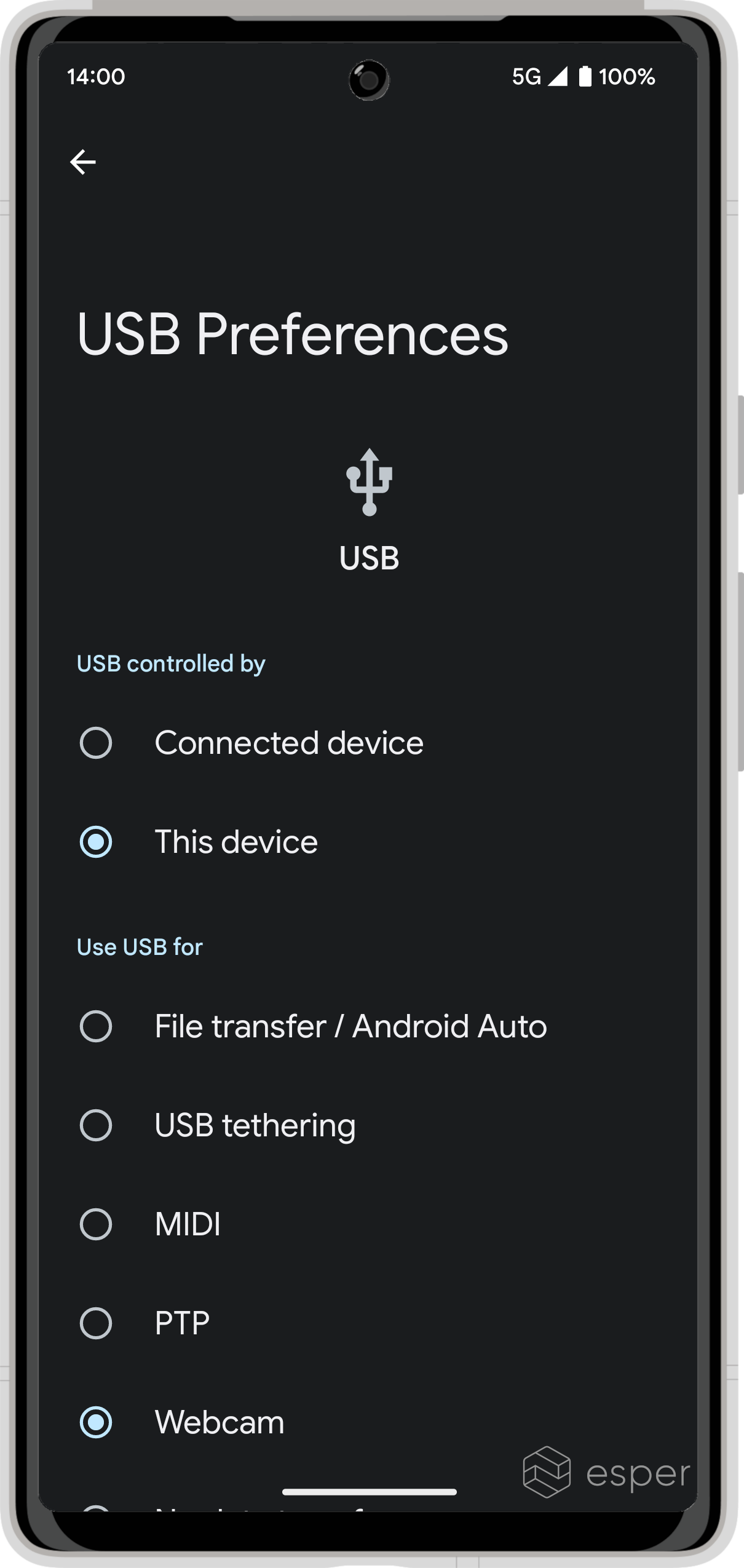
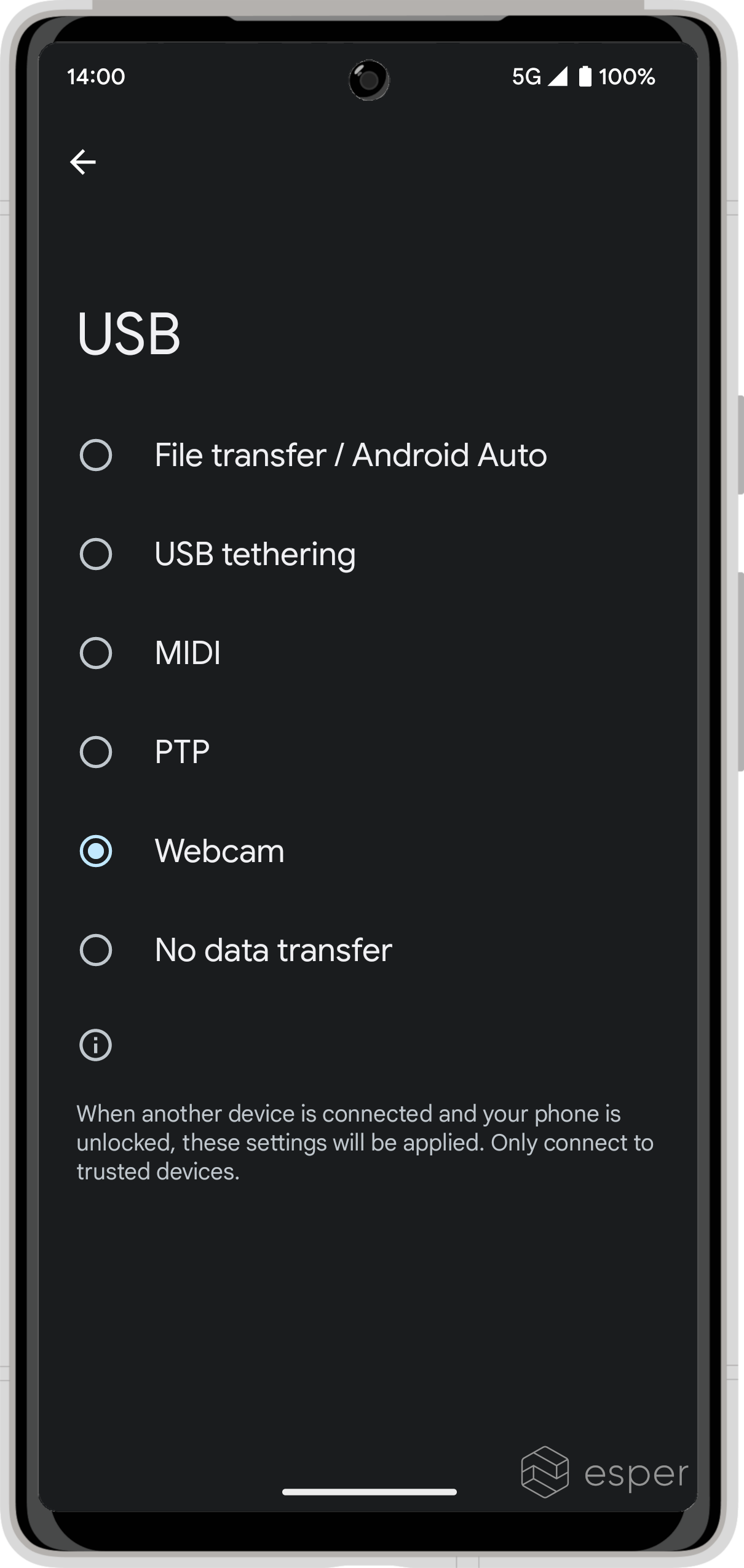
Android 14’s built-in webcam support mainly relies on two features: a Linux kernel config and a new system app. The Linux kernel config (CONFIG_USB_CONFIGFS_F_UVC) is necessary so that the Android device can be mounted as a UVC gadget. Fortunately, many devices upgrading to and nearly all devices launching with Android 14 will have a kernel with this config enabled. This is because it is enabled by default on Generic Kernel Image (GKI) versions starting from android12-5.10 and later, and devices launching with Android 12 or later on top of Linux kernel version 5.10 or higher are required to ship the GKI kernel.
Because major kernel version upgrades are rare in the Android space and since the Google Requirements Freeze (GRF) program allows for older vendor implementations to still be certifiable, some devices upgrading to Android 14 won’t have kernels that support the USB webcam function. It’s hard to put together a list of such devices, so the best way to tell if your device is capable is to check its kernel version and whether the config is enabled.
To check your device’s kernel version, run:
adb shell “cat /proc/version”
For example, here is the output from my Zenfone 9 running Android 13 (emphasis mine). Since it is using the android12-5.10 GKI, it should support the USB webcam feature.
Linux version 5.10.136-android12-9-00003-g8970630c07cd-ab9368044 (build-user@build-host) (Android (7284624, based on r416183b) clang version 12.0.5 (https://android.googlesource.com/toolchain/llvm-project c935d99d7cf2016289302412d708641d52d2f7ee), LLD 12.0.5 (/buildbot/src/android/llvm-toolchain/out/llvm-project/lld c935d99d7cf2016289302412d708641d52d2f7ee)) #1 SMP PREEMPT Sun Dec 4 07:30:39 UTC 2022
However, to actually verify that this is the case, I ran another command to see if “CONFIG_USB_CONFIGFS_F_UVC” appears in config.gz, a compressed copy of the configuration file used to build the kernel on the device.
adb shell "zcat /proc/config.gz | grep 'CONFIG_USB_CONFIGFS_F_UVC'"
Since the line “CONFIG_USB_CONFIGFS_F_UVC=y” appeared in the output, that means my Zenfone 9 can be turned into a USB webcam. That’s assuming, though, that the OEM includes the other feature that I mentioned is necessary for this to work: a new system app.
In Android 14 Beta 2 on Pixels, Google included a new system app called “DeviceAsWebcam” (com.android.deviceaswebcam). This app implements the “DeviceAsWebcam” service that I previously reported, which “turns an Android device into a webcam.” This “DeviceAsWebcam” service forwards camera frames to a /dev/video node that host devices can read from. SELinux policy dictates that only processes in the device_as_webcam domain, ie. only the DeviceAsWebcam system app, can access the /dev/video nodes. Thus, only the OEM can actually take advantage of Android 14’s native USB webcam support.
How does the DeviceAsWebcam app actually know when to start forwarding camera frames? When the new “USB webcam” option in “USB Preferences” is toggled, the system broadcasts the android.hardware.usb.action.USB_STATE intent with the “connected” and “uvc” intent extras. DeviceAsWebcam has a receiver for this intent, which starts the system service if the “uvc” intent extra is set to “true” and the framework method android.hardware.usb#isUvcSupportEnabled() returns true.
The method isUvcSupportEnabled() returns true when the system property “ro.usb.uvc.enabled” is set to true. This property must be set by the OEM at build time, and if it is not set, then “USB Preferences” won’t show the “USB webcam” option and DeviceAsWebcam won’t start. This property is only readable by system apps like Settings and the DeviceAsWebcam app, allowing them to know that the user intends to use their phone as a webcam.
Before DeviceAsWebcam starts forwarding frames, it’ll show a preview that lets the user see what’s on the camera before streaming. Once it starts streaming, DeviceAsWebcam will start a foreground service to ensure it is kept alive by the system. DeviceAsWebcam uses the Camera2 API and supports streaming at either 720p (1280x720) or 1080p (1920x1080p) resolutions. The exact encoding method, video parameters, and name displayed to the host depends on how the OEM sets up the UVC gadget using configfs. For example, on the Pixel 6-7, the UVC gadget function is configured in the init.gs[101|201].usb.rc file located in /vendor/etc/init/hw.
Although it’s long overdue, it’s good to see Google implement native USB webcam functionality into Android. Given the package name of the DeviceAsWebcam app is com.android.deviceaswebcam (emphasis mine), this feature likely won’t be exclusive to Pixel and should be available in the AOSP release of Android 14 later this year. In fact, the code change enabling CONFIG_USB_CONFIGFS_F_UVC in GKI was contributed by an engineer from Motorola, which has already implemented this exact functionality in their own devices such as the Edge 20 series. There’s also little in the way of preventing this feature from working on older Android versions so long as the aforementioned kernel config is enabled, and some developers are attempting to do just that.
Call this feature a “Continuity Camera” copy if you like, but at least Google didn’t make it exclusive to a single platform or device. Any phone running Android 14 with a kernel supporting the UVC gadget function can be turned into a standard USB webcam that works with any PC, and that’s a big deal.
Hero image source: fizkes/Shutterstock.com


