
Android

Android 13 Will Add a Setting to Throttle Internet Speeds

Mishaal Rahman
December 3, 2024

Learn More

Average Internet speed varies wildly by region, so it’s important for developers to consider how their applications behave when connectivity is suboptimal. Unforeseen problems may arise when a device’s Internet connection is slow, and developers can get ahead of these issues by testing their apps under simulated network conditions. However, neither Android Studio nor Android itself offer an easy way to throttle Internet speeds, leaving developers to find solutions for themselves. This will change in Android 13, with the addition of a new setting to throttle network speeds.

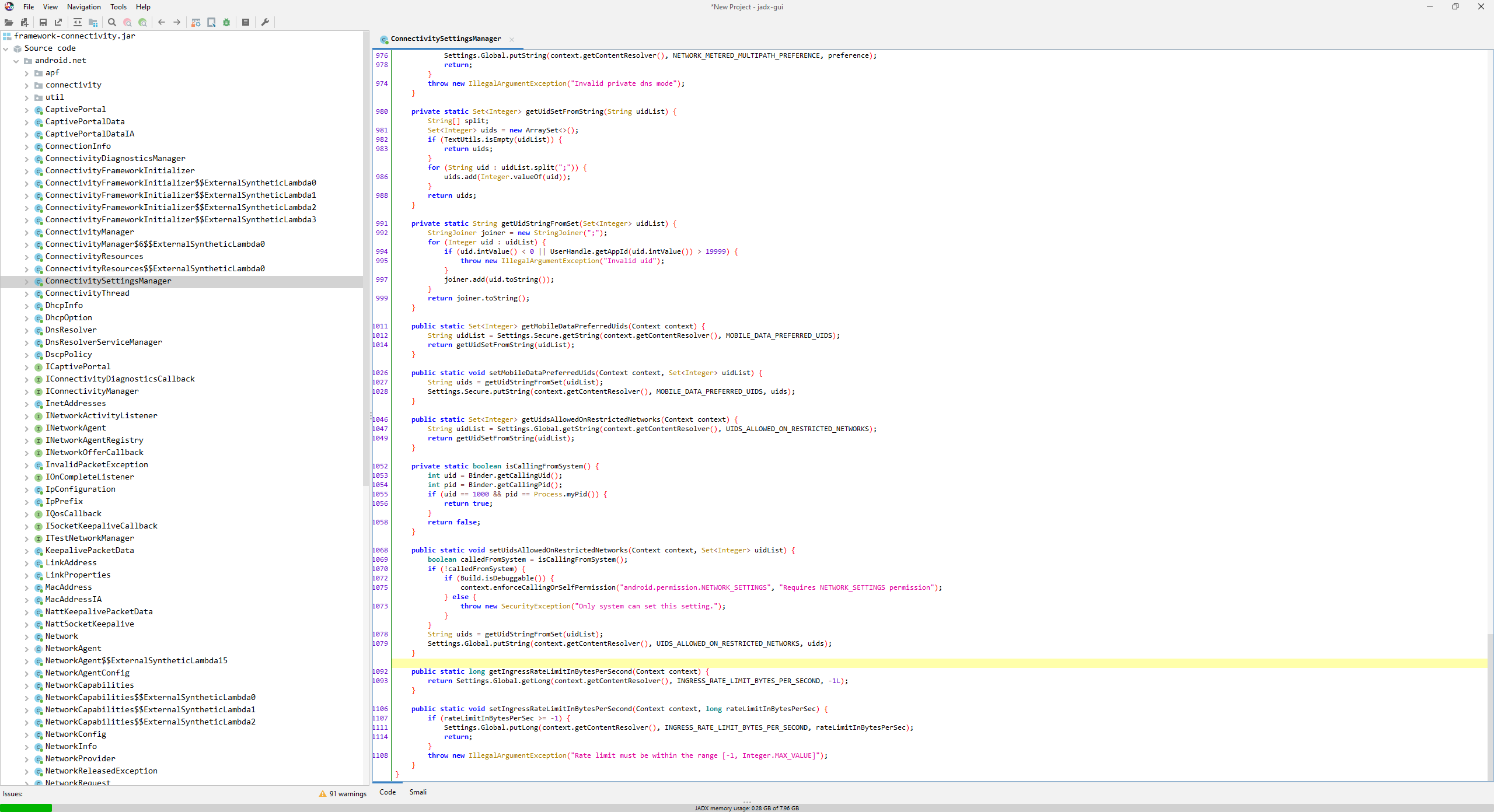
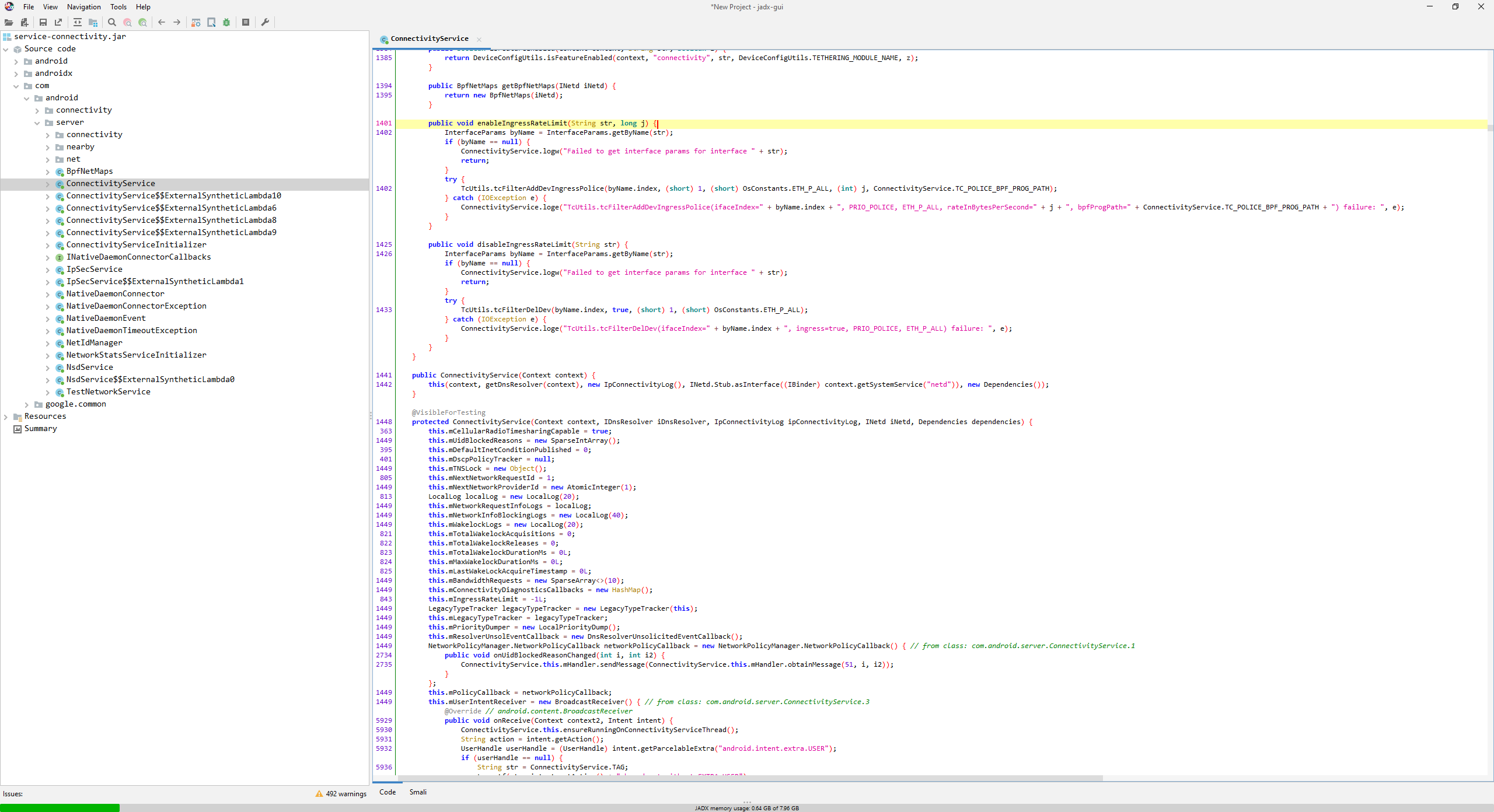
Over the last few weeks, Google has introduced new code to Android’s network connectivity APIs that enables bandwidth limiting. According to this new code, Android 13 will support setting a rate limit on any Internet-capable network, including both Wi-Fi and cellular networks. The rate limit is defined in bytes per second and is stored in the Settings.Global value ‘ingress_rate_limit_bytes_per_second.’ For example, if the desired rate limit is 1Mbps, then the value of ‘ingress_rate_limit_bytes_per_second’ will be ‘125000.’ A value ≤ 0 will disable throttling entirely. The rate limit is applied on a per-network basis, so a device that’s connected to multiple networks simultaneously could exceed the limit.

Android 13’s new bandwidth rate limiting API won’t be supported on all devices, however. The kernel must support the feature, which can be accomplished by building Linux with the following config options: CONFIG_NET_SCHED, CONFIG_NET_SCH_INGRESS, CONFIG_NET_CLS_MATCHALL, CONFIG_NET_CLS_ACT, CONFIG_NET_ACT_POLICE, and CONFIG_NET_ACT_BPF. The configuration value ‘config_ingress_rate_limiting_supported’ of ServiceConnectivityResources should be set to ‘true’ (via a runtime resource overlay) if the kernel was built with support for network rate limiting.
Android code
Android code
The new bandwidth rate limiting APIs have been added to Android's network connectivity APIs in Android 13 Developer Preview 2. The relevant code can be found in the JARs contained within the Tethering APEX

Although the second developer preview build of Android 13 contains the new bandwidth limiting APIs, there is currently no user-facing way for developers to set a rate limit. A Google employee has confirmed that the company has implemented a setting in developer options to throttle Internet speeds, however. This setting is expected to be available in the first beta build of Android 13, which is scheduled to release sometime next month. Until the setting arrives, developers can simulate slow network connectivity by manually starting the Android Emulator via the command line with the -netspeed option.

Android Device Management

Keep Exploring

No items found.

Esper is Modern Device Management

For tablets, smartphones, kiosks, point of sale, IoT, and other Android, iOS/iPadOS, Windows, and Linux edge devices.

Kiosk mode

Hardened device lockdown for all devices (not just kiosks)

Explore Kiosk Mode

Heading 1

Heading 2

Heading 3

Heading 4

Heading 5
Heading 6

Lorem ipsum dolor sit amet, consectetur adipiscing elit, sed do eiusmod tempor incididunt ut labore et dolore magna aliqua. Ut enim ad minim veniam, quis nostrud exercitation ullamco laboris nisi ut aliquip ex ea commodo consequat. Duis aute irure dolor in reprehenderit in voluptate velit esse cillum dolore eu fugiat nulla pariatur.

Block quote

Ordered list

  1. Item 1
  2. Item 2
  3. Item 3

Unordered list

  • Item A
  • Item B
  • Item C

Text link

Bold text

Emphasis

Superscript

Subscript

App management

Google Play, Apple App Store, private apps, or a mix of all three

Explore App Management

Heading 1

Heading 2

Heading 3

Heading 4

Heading 5
Heading 6

Lorem ipsum dolor sit amet, consectetur adipiscing elit, sed do eiusmod tempor incididunt ut labore et dolore magna aliqua. Ut enim ad minim veniam, quis nostrud exercitation ullamco laboris nisi ut aliquip ex ea commodo consequat. Duis aute irure dolor in reprehenderit in voluptate velit esse cillum dolore eu fugiat nulla pariatur.

Block quote

Ordered list

  1. Item 1
  2. Item 2
  3. Item 3

Unordered list

  • Item A
  • Item B
  • Item C

Text link

Bold text

Emphasis

Superscript

Subscript

Device groups

Manage devices individually, in user-defined groups, or all at once

Explore Device Groups

Heading 1

Heading 2

Heading 3

Heading 4

Heading 5
Heading 6

Lorem ipsum dolor sit amet, consectetur adipiscing elit, sed do eiusmod tempor incididunt ut labore et dolore magna aliqua. Ut enim ad minim veniam, quis nostrud exercitation ullamco laboris nisi ut aliquip ex ea commodo consequat. Duis aute irure dolor in reprehenderit in voluptate velit esse cillum dolore eu fugiat nulla pariatur.

Block quote

Ordered list

  1. Item 1
  2. Item 2
  3. Item 3

Unordered list

  • Item A
  • Item B
  • Item C

Text link

Bold text

Emphasis

Superscript

Subscript

Remote tools

Monitor, troubleshoot, and update devices without leaving your desk

Explore Remote Tools

Heading 1

Heading 2

Heading 3

Heading 4

Heading 5
Heading 6

Lorem ipsum dolor sit amet, consectetur adipiscing elit, sed do eiusmod tempor incididunt ut labore et dolore magna aliqua. Ut enim ad minim veniam, quis nostrud exercitation ullamco laboris nisi ut aliquip ex ea commodo consequat. Duis aute irure dolor in reprehenderit in voluptate velit esse cillum dolore eu fugiat nulla pariatur.

Block quote

Ordered list

  1. Item 1
  2. Item 2
  3. Item 3

Unordered list

  • Item A
  • Item B
  • Item C

Text link

Bold text

Emphasis

Superscript

Subscript

Touchless provisioning

Turn it on and walk away — let your devices provision themselves

Explore Touchless Provisioning

Heading 1

Heading 2

Heading 3

Heading 4

Heading 5
Heading 6

Lorem ipsum dolor sit amet, consectetur adipiscing elit, sed do eiusmod tempor incididunt ut labore et dolore magna aliqua. Ut enim ad minim veniam, quis nostrud exercitation ullamco laboris nisi ut aliquip ex ea commodo consequat. Duis aute irure dolor in reprehenderit in voluptate velit esse cillum dolore eu fugiat nulla pariatur.

Block quote

Ordered list

  1. Item 1
  2. Item 2
  3. Item 3

Unordered list

  • Item A
  • Item B
  • Item C

Text link

Bold text

Emphasis

Superscript

Subscript

Reporting and alerts

Custom reports and granular device alerts for managing by exception

Explore Reporting & Alerts

Heading 1

Heading 2

Heading 3

Heading 4

Heading 5
Heading 6

Lorem ipsum dolor sit amet, consectetur adipiscing elit, sed do eiusmod tempor incididunt ut labore et dolore magna aliqua. Ut enim ad minim veniam, quis nostrud exercitation ullamco laboris nisi ut aliquip ex ea commodo consequat. Duis aute irure dolor in reprehenderit in voluptate velit esse cillum dolore eu fugiat nulla pariatur.

Block quote

Ordered list

  1. Item 1
  2. Item 2
  3. Item 3

Unordered list

  • Item A
  • Item B
  • Item C

Text link

Bold text

Emphasis

Superscript

Subscript
